Department Management
The Department section allows administrators to manage all organization departments from the dashboard.
Features
- Add new departments
- Update existing departments
- Delete departments
- English and Arabic support
- Dynamic department listing
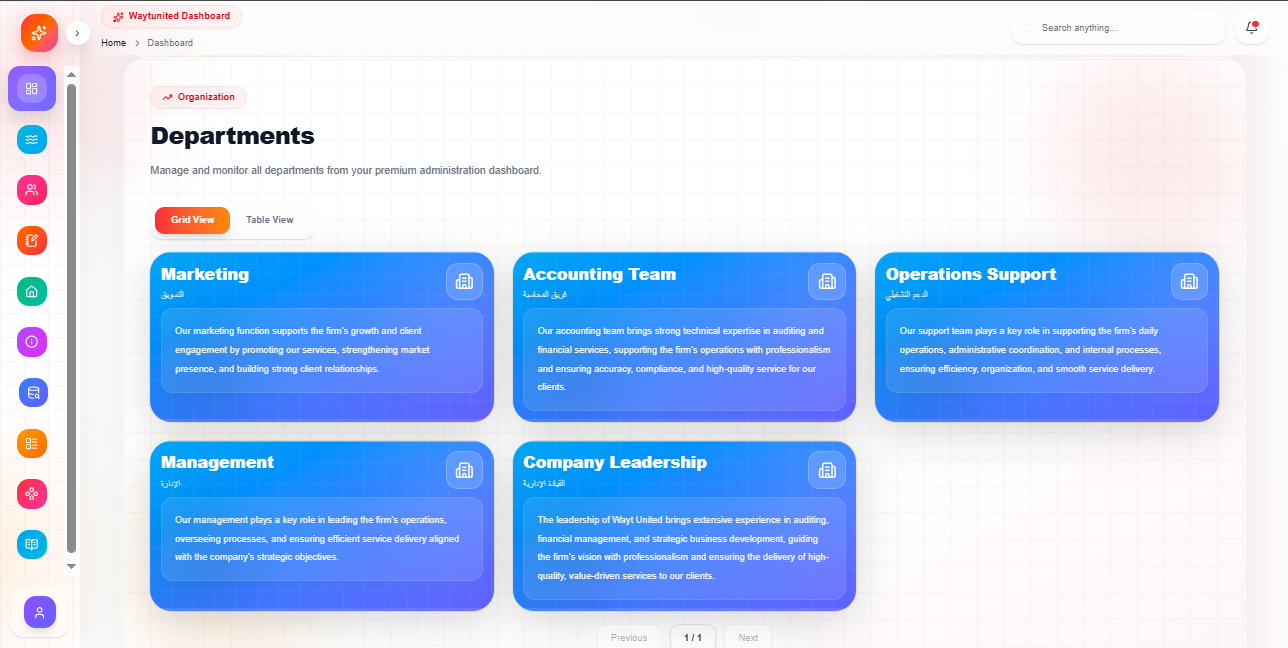
Department Fields
Each department contains:
- Department Name (EN)
- Department Name (AR)
- Description (EN)
- Description (AR)
Add New Department
To create a department:
- Open the Department Management page
- Enter department information
- Click the Add button
Required Fields
English Name
Finance Department
Arabic Name
قسم المالية
Description
Add a short department description in both languages.
Update Department
To edit a department:
- Click the Edit icon
- Update the information
- Click Update
The form automatically loads existing department data.
Delete Department
To remove a department:
- Click the Delete icon
- The department is removed from the list
Deleted departments cannot be recovered.
API Endpoints
Get Departments
GET /api/department
Add Department
POST /api/department
Update Department
PUT /api/department/:id
Delete Department
DELETE /api/department/:id
Dashboard Features
Department List
The dashboard displays all departments in responsive cards.
Each card contains:
- Department name
- Department description
- Edit button
- Delete button
Responsive Design
The department section is fully responsive.
Desktop
- Multi-column layout
- Full management controls
Mobile
- Stacked cards
- Touch-friendly actions
UI Components Used
- Card
- Input
- Textarea
- Button
- Label
Summary
The Department Management system provides:
- Department CRUD operations
- Multilingual support
- Responsive dashboard UI
- Real-time updates
- Simple management workflow